**Prompt engineering is a new discipline for developing and optimizing prompts. Understanding what good prompts look like also gives a better understanding of the capabilities and limitations of large language models (LLMs).**
Generated with Grok
Researchers use prompt engineering to improve the performance of models in complex tasks such as arithmetic reasoning. Developers use prompt engineering to create robust and effective prompting techniques.
The success of AI applications such as ChatGPT is creating an increasing demand for prompt engineers. Prompt engineers formulate prompts to achieve optimal response results. But what do such prompts look like? That’s the question we explore in this article.
Many companies are looking for prompt engineers and pay them very high salaries. As Bloomberg [reports](https://www.bloomberg.com/news/articles/2023-03-29/ai-chatgpt-related-prompt-engineer-jobs-pay-up-to-335-000?leadSource=uverify+wall){:target="_blank" rel="noopener"}, the company [Anthropic](https://www.anthropic.com/){:target="_blank" rel="noopener"} has just advertised a position for a prompt engineer. The annual salary is up to 335,000 US dollars. So it’s time to take a deeper look at the topic.
## Prompting Basics
First of all, it is important to note that the results of an LLM can vary depending on the model version. Moreover, the same model always produces different answers. In this article, we use the Bing Chatbot and ChatGPT. Now let’s get down to the basics.
A prompt can consist of several elements, these are:
* **Instruction:** A specific task to be performed by the model.
* **Context:** Additional information so that the model can respond better.
* **Input:** A question that we ask the model.
* **Output Indicator:** Specifies the type of output.
It should be noted that a prompt does not have to contain all elements.
We start with a simple prompt.
**Prompt:**
> Complete the sentence: The sun is
**Result:**
> The sun is a star. Is there anything else you would like to know?
We gave the model a task and an input, and the model outputted a result. The approach of designing such prompts and instructing the model to execute them is called prompt engineering. Today’s LLMs can handle very complex tasks from text summaries to code generation. It’s time to look at some tips on how to write good prompts.
## Tips for Designing Prompts
After many attempts, we learned that you should start with simple prompts first. Then you can refine the prompts until you are satisfied. In general, specificity and simplicity often lead to better results. You can practice with many Playgrounds such as OpenAI ChatGPT, DALL-E 2 or Bing Chatbot. Do this because you will get better and better with time.
You have to tell the model what to do, for example, “Write”, “Summarize”, “Paint” or “Translate”. In addition, you have to experiment with keywords and context to find what works best for your task. You should avoid imprecision and try to be as specific as possible. The following examples give you an impression.
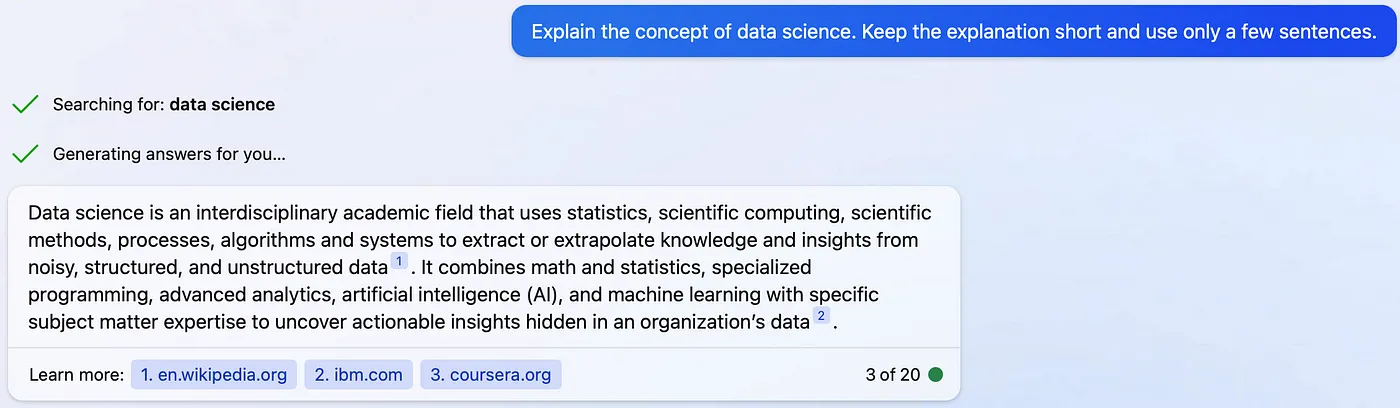
Example 1 — Bing Chatbot: Imprecise (Screenshot by authors)
In example 1, it is not clear from the prompt how many sentences the model should use. Furthermore, it is not known how detailed the explanation should be.
Example 2 — Bing Chatbot: More exact (Screenshot by author)
The prompt in example 2 indicates that the explanation should have a length of two sentences. It should also be understandable for a high school student. The specific wording also leads to a more precise result.
Let us now look at advanced prompting strategies.
## Advanced Prompting
The explanation of the prompting variants is based on the [Prompt Engineering Guide](https://www.promptingguide.ai/){:target="_blank" rel="noopener"}. We can recommend everyone to read this guide.
### Zero-shot Prompting
With **zero-shot prompting**, you ask the model to respond directly. You do not give the model examples for the task. Some LLMs, such as ChatGPT, are capable of zero-shot prompting, although this also depends on the complexity of the task. If zero-shot prompting does not work, you can use examples in the prompt. This procedure is called few-shot prompting, and we describe it in the next section.
### Few-shot Prompting
With few-shot prompting, we give the model a few examples to solve a task. You can use it mainly for more complex tasks. The following is an example from [Brown et al. 2020](https://arxiv.org/abs/2005.14165){:target="_blank" rel="noopener"}:
**Prompt:**
> A “whatpu” is a small, furry animal native to Tanzania. An example of a sentence that uses the word whatpu is:
>
> We were traveling in Africa and we saw these very cute whatpus.
>
> To do a “farduddle” means to jump up and down really fast. An example of a sentence that uses the word farduddle is:
**Output:**
> When we won the game, we all started to farduddle in celebration.
The model has learned by one example how to solve the task. We speak of 1-shot. For complex tasks, you can use several examples (2-shot, 3-shot, 4-shot, etc.).
Few-shot prompting works well for many tasks, but it is still not a perfect technique, especially when we have more complex thinking tasks. The [Prompt Engineering Guide](https://www.promptingguide.ai/techniques/fewshot){:target="_blank" rel="noopener"} shows an example of this.
### Other techniques
There are many other techniques for writing prompts for complex tasks.
These are:
* [Chain-of-Thought Prompting](https://www.promptingguide.ai/techniques/cot){:target="_blank" rel="noopener"}
* [Self-Consistency](https://www.promptingguide.ai/techniques/consistency){:target="_blank" rel="noopener"}
* [Generate Knowledge Prompting](https://www.promptingguide.ai/techniques/knowledge){:target="_blank" rel="noopener"}
* [Automatic Prompt Engineer](https://www.promptingguide.ai/techniques/ape){:target="_blank" rel="noopener"}
* [Active-Prompt](https://www.promptingguide.ai/techniques/activeprompt){:target="_blank" rel="noopener"}
* [Directional Stimulus Prompting](https://www.promptingguide.ai/techniques/dsp){:target="_blank" rel="noopener"}
* [ReAct Prompting](https://www.promptingguide.ai/techniques/react){:target="_blank" rel="noopener"}
* [Multimodal CoT Prompting](https://www.promptingguide.ai/techniques/multimodalcot){:target="_blank" rel="noopener"}
You can read about how each prompting technique works in the Prompt Engineering Guide. The links will take you directly to the appropriate website.
Next, let’s look at three examples of how ChatGPT can help Data Scientists in their everyday lives.
## Useful Prompts for Data Scientists
### Code documentation
We have implemented a new function and need a docstring in Google style for it. As an example, we use a function that outputs a precision recall plot.
**ChatGPT Prompt:**
> Create a docstring in Google style for the following Code:
```python
def plot_precision_recall(y_true, y_pred, algorithm_name = 'foo'):
precision, recall, thresholds = precision_recall_curve(y_true, y_pred)
fig = px.area(
x=recall, y=precision,
title=f'Precision-Recall Curve (AUC={auc(recall, precision):.4f})',
labels=dict(x='Recall', y='Precision'),
width=700, height=500
)
fig.add_shape(
type='line', line=dict(dash='dash'),
x0=0, x1=1, y0=1, y1=0
)
fig.update_yaxes(scaleanchor="x", scaleratio=1)
fig.update_xaxes(constrain='domain')
fig.write_image(f'images/precision_recall_{algorithm_name}.png')
```
**ChatGPT Output:**
> Here’s a possible Google-style docstring for the ```plot_precision_recall``` function:
```python
def plot_precision_recall(y_true, y_pred, algorithm_name='foo'):
"""Plot the precision-recall curve for a binary classification problem.
Args:
y_true (array-like of shape (n_samples,)): True binary labels (0 or 1).
y_pred (array-like of shape (n_samples,)): Predicted probabilities of the positive class.
algorithm_name (str, optional): Name of the algorithm used to make the predictions. Defaults to 'foo'.
Returns:
None.
Generates an area plot of precision vs. recall, along with the area under the curve (AUC) score,
and saves it as a PNG image in the 'images/' directory. The plot is styled using Plotly Express.
Example:
>>> y_true = [0, 1, 1, 0, 1]
>>> y_pred = [0.1, 0.8, 0.6, 0.3, 0.9]
>>> plot_precision_recall(y_true, y_pred, algorithm_name='logistic_regression')
"""
```
> This docstring follows the Google-style conventions, including a summary of what the function does, a list of the function arguments (with types, shapes, and defaults), and a description of what the function returns. The docstring also includes a brief example of how to use the function.
The result is really good. Or what do you think? ChatGPT wrote the docstring in Google style, just like we wanted. It also added a description of the function and an example. ChatGPT takes extremely tedious work away from Data Scientists so you can concentrate on the important tasks.
### Explaining code
Next, ChatGPT is to explain a code section for sequencing time series.
**ChatGPT Prompt:**
> Explain the following code:
```python
def get_sequence_data(X, lookback):
output_data = []
for i in range(len(X) - lookback):
t = []
for j in range(0, lookback):
t.append(X[i+j, :])
output_data.append(t)
return np.array(output_data)
```
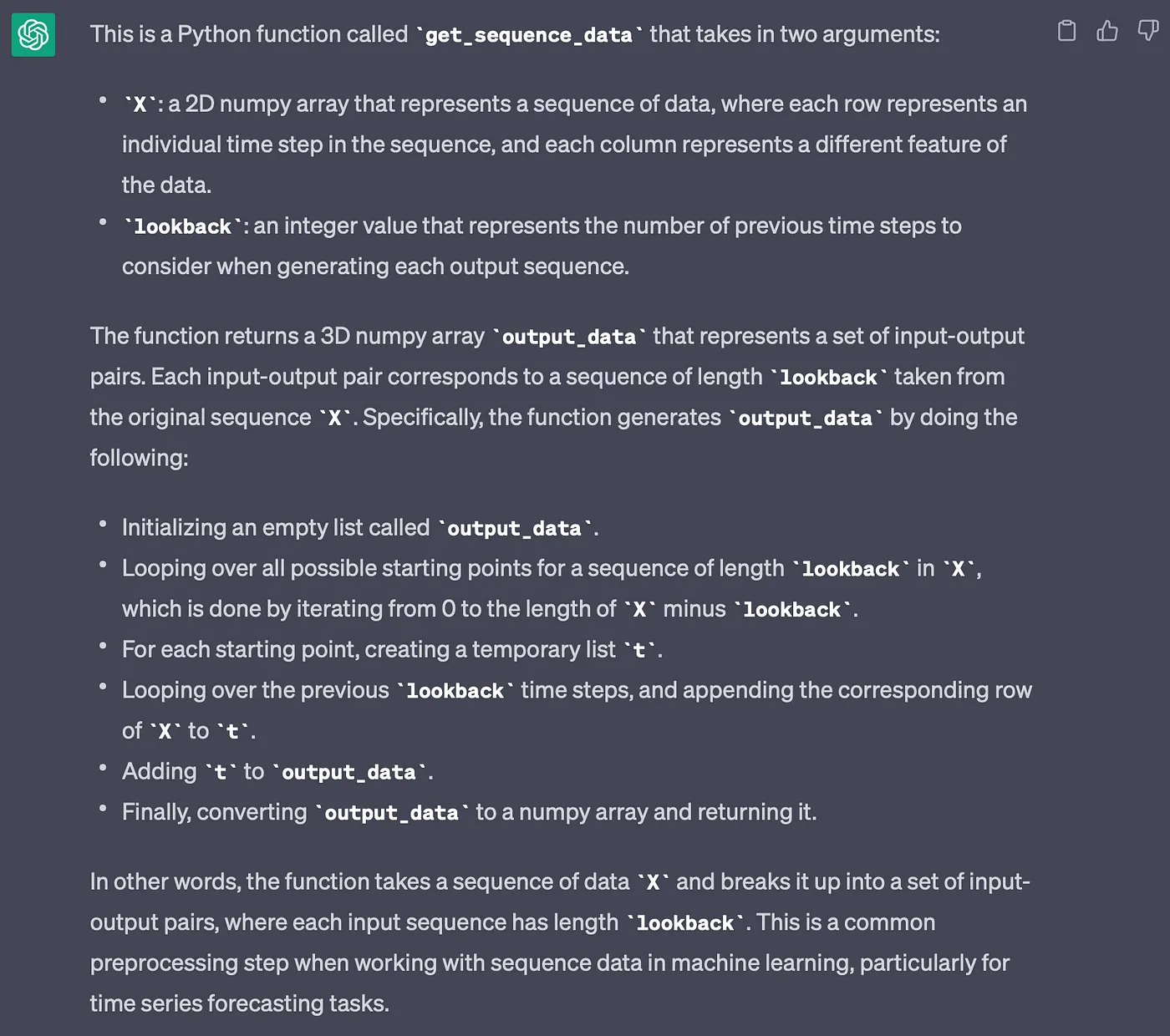
**ChatGPT Output:**
ChatGPT code explanation (Image by authors)
ChatGPT provides a good explanation of the function. First it refers to the input arguments. Then it explains the function in detail. It also concludes with a brief explanation of the function. ChatGPT has thus understood the context. The explanation of code sections can assist Data Scientists in understanding complex function. That’s very helpful. We can say that from our own experience.
### Exploring faster alternatives
In this section we want to optimise the previous function in terms of runtime. Take a look at the following prompt.
**ChatGPT Prompt:**
> Speed up the running time of the following code:
```python
def get_sequence_data(X, lookback):
output_data = []
for i in range(len(X) - lookback):
t = []
for j in range(0, lookback):
t.append(X[i+j, :])
output_data.append(t)
return np.array(output_data)
```
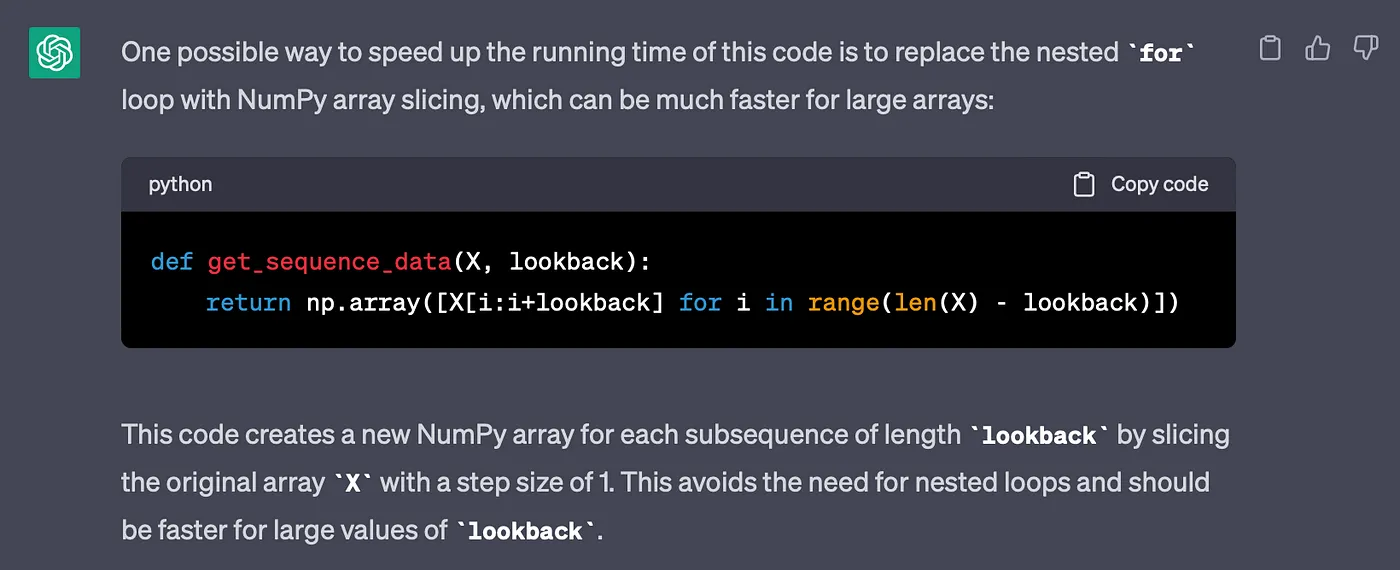
**ChatGPT Output:**
ChatGPT implementation (Image by authors)
ChatGPT suggests that we should use NumPy array slicing. It also gives us the optimised code. Great! Now, we just have to check if the new function works correctly and is faster. The following code performs the check.
```python
import numpy as np
X = np.random.rand(10, 3)
%timeit seq_data1 = get_sequence_data(X, 2) # 15.9 µs
%timeit seq_data2 = get_sequence_data_chatgpt(X, 2) # 6.28 µs
print(np.array_equal(seq_data1, seq_data2)) # True
```
First, we create a test data set. Then we measure the runtime of the two functions. We can see that the ChatGPT implementation is significantly faster and produces the same result.
## Learning materials and tools
**PromptPal**
This tool helps you find the best prompts to improve your code or marketing. The tool analyses prompts in terms of their requirements so that they get the most accurate answers. The tool [PromptPal](https://www.promptpal.net/){:target="_blank" rel="noopener"} is free.
**Prompt Engineering Daily**
It’s a [newsletter](https://www.neatprompts.com/){:target="_blank" rel="noopener"} that gives you tips for optimal prompts. The newsletter shows you how to get the full potential out of ChatGPT. It’s free.
**Promptbase**
It’s a platform that provides and sells good prompts. You can also sell your own prompts. With [Promptbase](https://promptbase.com/){:target="_blank" rel="noopener"} you can save money and time because you can use good prompts directly.
**Learn Prompting**
It’s an open-source course that teaches how to write good prompts. In addition to video courses, Learning Prompt has an active community on Discord. By exchanging ideas with others, you can acquire valuable AI knowledge. The course [Learn Prompting](https://learnprompting.org/){:target="_blank" rel="noopener"} is free.
## Conclusion
In this article, we have presented how you can construct prompts. We also provided some tips on how to write good prompts. We then looked at advanced prompting techniques and provided links.
Finally, we discussed three examples of how ChatGPT can help Data Scientists in their daily work. The current LLMs are very powerful, and we should integrate the models into our everyday life as assistance.
💡 Do you enjoy our content and want to read super-detailed guides about AI Engineering? If so, be sure to check out our premium offer!