**AI Agents are becoming more powerful and can independently solve complex tasks. A key part of developing advanced AI Agents is memory. This allows an Agent to remember past interactions and engage in context-aware, human-like conversations.**
Generated with AI
Memory is generally understood as the ability of an Agent to store insights and facts about the user. It's about creating a profile of the user to personalize the Agent's responses.
In this step-by-step guide, we show you how to create a local AI Agent with memory. For this, we use the Python framework Agno and OpenAI's new open-source LLM gpt-oss.
Agno Agents natively support Agentic Memory Management. With Agentic Memory, the Agent can create, update, and delete memories from user conversations by itself.
Let's get started!
## Sneak Peak
## Tech Stack
For our demo AI Agent, we use OpenAI's `gpt-oss:20b` as LLM. gpt-oss:20b is an open-weight model designed for powerful reasoning, agentic tasks, and versatile developer use cases.
To create the app, we use the following technologies:
* [Agno](https://docs.agno.com/introduction){:target="_blank" rel="noopener"} to implement the AI Agent
* Agno's Playground as an intuitive interface for testing and interacting with AI Agents
## Prerequisites
You will need the following prerequisites:
* Python package manager of your choice (We use [conda](https://docs.conda.io/en/latest/miniconda.html){:target="_blank" rel="noopener"}).
* A code editor of your choice (We use [Visual Studio Code](https://code.visualstudio.com/){:target="_blank" rel="noopener"}).
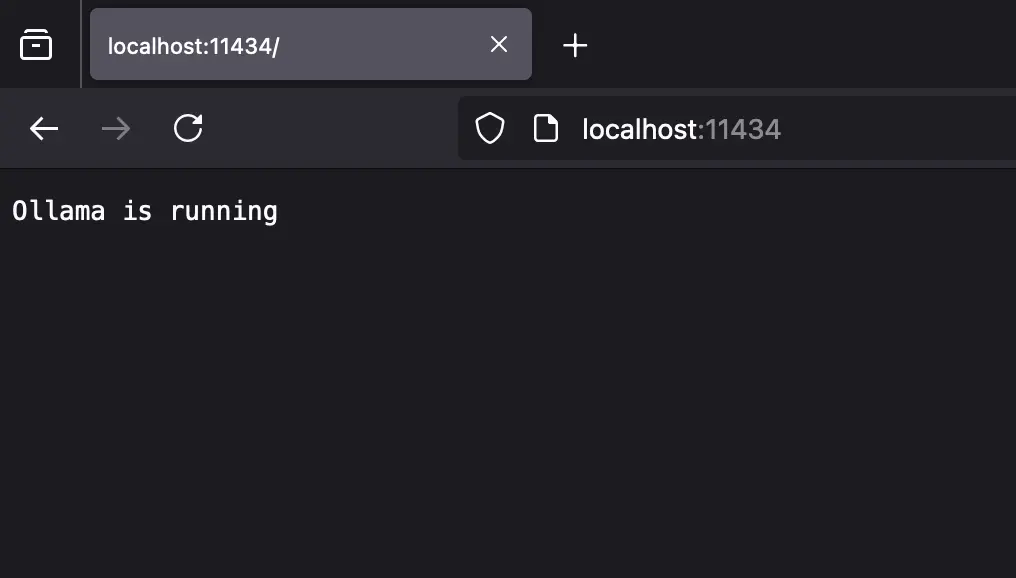
* Download [Ollama](https://ollama.com){:target="_blank" rel="noopener"} and install `gpt-oss`. Make sure that it runs on your computer. You can download the model using `ollama run gpt-oss`.
* A computer with a GPU (We use a MacBook Pro M4 Max 48 GB).
*We recommend a computer with at least 16GB RAM to run the examples in this guide efficiently.*
## Step-by-Step Guide
### Step 1: Set up the development environment
* **Create a conda environment**: A virtual environment keeps your main system clean.
```bash
conda create -n agent-memory-tools python=3.12.7
conda activate agent-memory-tools
```
* **Clone the GitHub repo**:
```bash
git clone https://github.com/tinztwins/finllm-apps.git
```
* **Install requirements**: Go to the folder `agent-memory-tools` and run the following command:
```bash
pip install -r requirements.txt
```
* Make sure that **Ollama** is running on your computer:
### Step 2: Create the AI Agent with Agno
* **Import required libraries**: First, we need to import all necessary libraries.
```python
from agno.agent import Agent
from agno.memory.v2.db.sqlite import SqliteMemoryDb
from agno.memory.v2.memory import Memory
from agno.models.ollama import Ollama
from agno.tools.yfinance import YFinanceTools
from agno.playground import Playground
```
* **Initialize memory**: The `Memory` class in Agno lets you manage all aspects of user memory. We use SQLite as the database for the memories. In addition, we use `gpt-oss:latest` as the large language model via Ollama. With the `delete_memories` parameter, we enable the ability to delete memories.
```python
memory = Memory(
model=Ollama(id="gpt-oss:latest"),
db=SqliteMemoryDb(table_name="user_memories", db_file="tmp/agent.db"),
delete_memories=True,
clear_memories=True,
)
```
* **Create an Agent**: In Agno, you can create an Agent with `Agent()`. You can pass this object several parameters, e.g., `model`, `tools`, `description`, `instructions`, `memory`, and `enable_agentic_memory`. First, we assign the LLM to the Agent via Ollama.
```python
# Agent Code
agent = Agent(
model=Ollama(id="gpt-oss:latest"),
tools=[
YFinanceTools(stock_price=True,
company_info=True,
stock_fundamentals=True,
analyst_recommendations=True,
historical_prices=True),
],
description="You are an investment analyst that researches stock prices, company infos, stock fundamentals, analyst recommendations and historical prices",
instructions=["Format your response using markdown and use tables to display data where possible."],
user_id="tinztwins",
memory=memory,
enable_agentic_memory=True,
markdown=True
)
```
* **Add tools to the Agent**: To give the Agent access to financial information, we use `YFinanceTools`. This allows the Agent access to stock price data, company info, fundamental data, analyst recommendations, and historical price information.
* **Description and instructions**: Through the `instructions` parameter, you can provide the Agent with a list of instructions. The `description` is added at the beginning of the system message. You can control the Agent's behavior through these parameters.
* **Add memory to the Agent**: We assign the `memory` variable defined above to the `memory` parameter. There, we store the user memories with the `user_id=tinztwins`. The parameter `enable_agentic_memory` gives the Agent the ability to update memories. `markdown=True` ensures that the output format is Markdown.
* **Serve the Agent via a Playground Server**: To use Agno's Playground, we need to provide the Agent as a playground server. The Python code looks as follows:
```python
playground = Playground(agents=[agent])
app = playground.get_app()
if __name__ == "__main__":
playground.serve("playground:app", reload=True)
```
### Step 3: Set up Agno's Playground
The playground offers a robust interface for testing your agent-based systems with extensive features. First, you need to create an Agno account at [app.agno.com](https://app.agno.com/){:target="_blank" rel="noopener"} and copy your API Key (top right corner).
Next, you need to export the API key in your workspace. To do this, enter the following command in your terminal:
```bash
export AGNO_API_KEY=ag-***
```
### Step 4: Run the demo app
Navigate to the project folder and run the following commands.
**Start the Playground Server**:
```bash
python playground.py
```
The playground server is running at `http://localhost:7777`.
**Test the Agent in the Playground UI**:
Open your browser and go to app.agno.com. The playground opens, and you can test your Agent.
## Conclusion
Congratulations! You have successfully created a local AI Agent with memory using Agno and OpenAI's powerful "gpt-oss" model. In this step-by-step guide, you learned how to give an Agent memory, allowing it to provide personalized responses.
By adding YFinanceTools, the Agent has access to financial data. That shows how simple it is to add more features to the Agent. With Agno's intuitive framework and the local capabilities of gpt-oss, you are no longer dependent on external APIs for development. This keeps your data private.
We hope this tutorial was insightful and helps you to develop the next generation of AI applications.
Happy coding!
💡 Do you enjoy our content and want to read super-detailed guides about AI Engineering? If so, be sure to check out our premium offer!