**Docker is a tool for simplifying application development and deployment. It makes it easy to package, distribute, and run applications using Docker images and containers. In this article, we'll dive into the essential components.**
Generated with Grok
Whether you're a seasoned developer or new to coding, a clear understanding of the Docker basics will enhance your ability to use containerization technology.
You should understand some important concepts when using Docker. We explain the key Docker components and show you the CLI commands we use most often in practice.
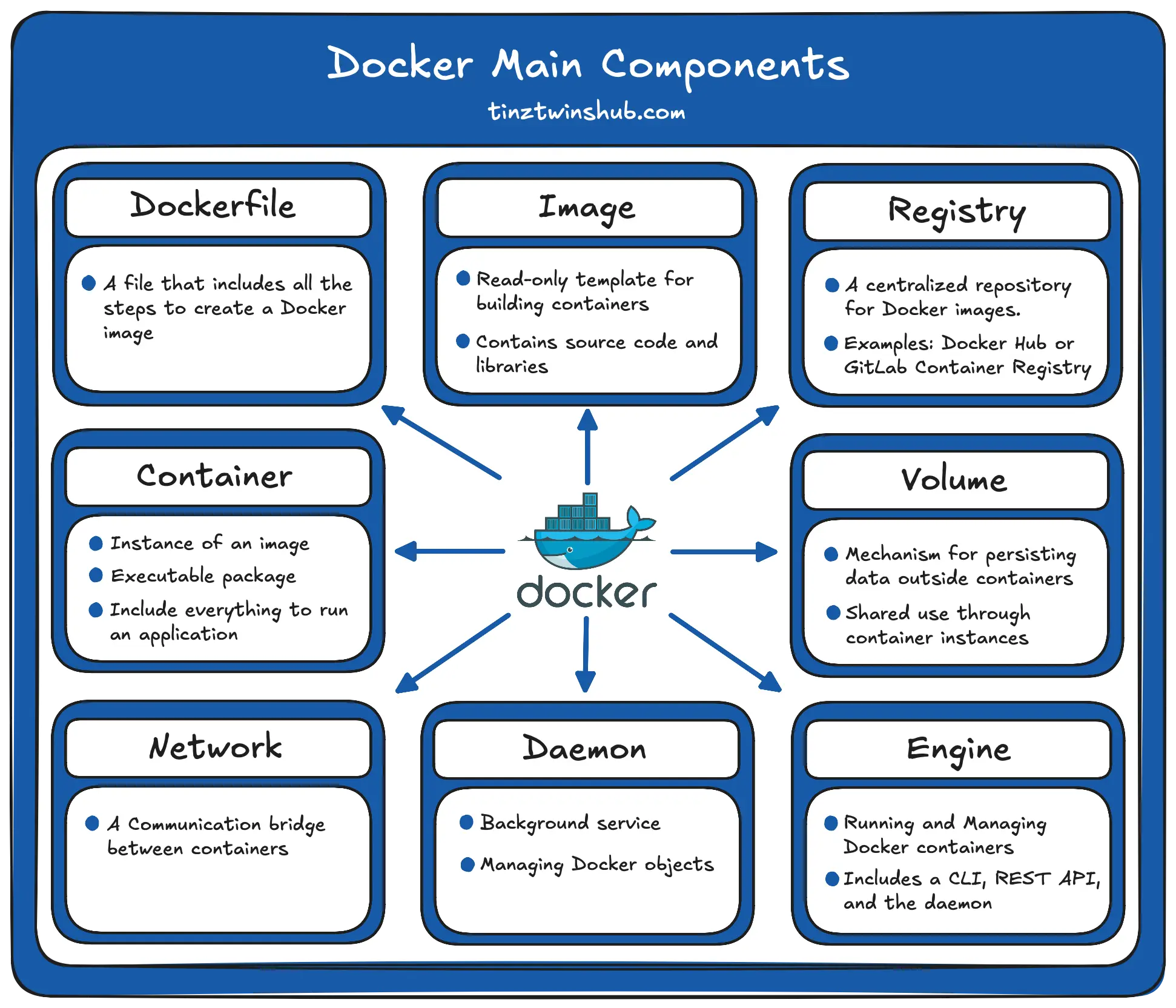
In the following figure, you can see the Docker main components:
## Main Components
### Dockerfile
- **What it is:** A file that includes all the steps to create a Docker image.
- **Explanation:** It's like a recipe for creating a Docker image. The Dockerfile specifies the base image, adds your application code, and sets configurations. It defines how the image should be created.
### Docker Image
- **What it is:** A Docker image is a read-only template of your application.
- **Explanation:** It contains everything your application needs to run: source code, libraries, dependencies, and even the operating system. You can create an image with a Dockerfile or download an image from a Docker registry. An image is like a ready-to-go package for your software.
**Essential commands:**
* `docker pull `: Pull the image from a Docker registry
* `docker run -d `: Pull the image and start the container in background (-d, or --detach) and print container ID
* `docker rmi `: Remove the image using its ID or name
* `docker image list`: List images by name and tag
* `docker image prune`: Remove all dangling images
### Docker Registry
- **What it is:** A centralized repository for Docker images.
- **Explanation:** A Docker Registry, such as Docker Hub or GitLab Container Registry, is a place where you can store and share your Docker images. It's like an online library for images that you and others can use.
### Docker Container
- **What it is:** A running instance of a Docker image.
- **Explanation:** An image is a template of your application, and a container is the running application. It is isolated from the rest of your system, ensuring it works on any computer.
**Essential commands:**
* `docker ps -a`: Show running and stopped containers (-a, -all), default shows just running containers
* `docker stop `: Stop one or more running containers
* `docker restart `: Restart one or more containers
* `docker rm `: Remove one or more containers
* `docker exec -it bash`: Opens a terminal session in a running container. This allows you to execute commands in the container.
* `docker container prune`: Remove all stopped containers
### Docker Volume
- **What it is:** A way to persist data outside of a container.
- **Explanation:** Containers are temporary, meaning they can be started and stopped easily. Volumes provide a way to store and share data between your host machine and the container, ensuring that your data is not lost when you stop or delete the container.
**Essential commands:**
* `docker volume create `: Create a new volume with a specific name
* `docker volume rm `: Remove a volume
* `docker volume ls`: List all volumes
### Docker Network
- **What it is:** A communication bridge between Docker containers.
- **Explanation:** The Docker Network allows containers to talk to each other. It's like a private network for your containers, ensuring seamless communication while keeping them isolated from external influences.
**Essential commands:**
* `docker network create `: Create a new network with a specific name
* `docker network rm `: Remove a network
* `docker network ls`: List all networks
### Docker Daemon
- **What it is:** The background service that manages Docker objects on your system. Docker objects include images, containers, volumes, and networks.
- **Explanation:** The Docker Daemon is like a behind-the-scenes worker. It handles creating, running, and monitoring containers. You interact with it through the Docker command-line interface (CLI) or the Docker Desktop UI.
### Docker Engine
- **What it is:** The combination of the Docker Daemon and the Docker CLI.
- **Explanation:** The Docker Engine is the overall software that allows you to work with containers. You use the Docker CLI or the Docker Desktop UI to give commands, and the Docker Daemon manages the containers based on those commands.
## Install Docker
Docker is available for all major operating systems (Windows, macOS, and Linux). You can easily install Docker by following the instructions for your operating system on the [Docker website](https://docs.docker.com/engine/install/){:target="_blank" rel="noopener"}.
After the installation, you should check your Docker version. If no errors occur, everything works.
* `docker --version`: Print the installed Docker version
It’s always the best to use the latest version.
## Conclusion
In summary, Docker makes it easy to package, distribute, and run applications using images and containers. We have been using Docker for many years and recommend that everyone learn it. It makes application development and deployment much easier.
Happy building, and have fun with Docker.
💡 Do you enjoy our content and want to read super-detailed guides about AI Engineering? If so, be sure to check out our premium offer!