**A large amount of data is available on the web. Third-party applications can access this data via an application programming interface (API). Such services are also called web services. One of the most popular ways to build APIs is the representational state transfer (REST) architecture style.**
Photo by Ilya Pavlov on Unsplash
In this article, you will learn the basics of REST and how to build and use REST APIs. Python provides great tools to get data from REST APIs and to build your own REST APIs.
We want to give you an overview of this article. The steps are the following:
1. **REST Principles**
2. **REST API basics**
3. **Building REST APIs with Python**
4. **Consuming REST APIs with Python**
5. **Conclusion**
6. **Useful links**
## REST Principles
The basis of REST is the [client-server model](https://en.wikipedia.org/wiki/Client%E2%80%93server_model){:target="_blank" rel="noopener"} over a network. However, REST offers a few constraints for the software architecture. These constraints serve to promote the performance, scalability, simplicity and reliability of the system.
### REST constraints:
* **Stateless:** The server does not store any state between requests from the client.
* **Client-server:** The client and server are decoupled from each other and are developed independently.
* **Caching:** Caching of the retrieved data from the server on the client or the server.
* **Uniform interface:** The server provides a uniform interface for accessing the resources.
* **Layered system:** The client can access the resources of the server indirectly (e.g. proxy or load balancer).
* **Code on demand (optional):** The server can deliver code (e.g. JavaScript) to the client. The client can then execute this code on the client side.
## REST API basics
REST APIs provide access to web services via a public web URL. You access data via a REST API by sending an HTTP request to a URL and processing the response.
### HTTP Methods
REST APIs listen for HTTP methods such as **GET**, **POST** and **DELETE**. A resource is all the data available in the web service. The HTTP method tells the API what action will be performed on the resource.
**Overview HTTP Methods:**
* **GET**: Fetch data from an existing resource
* **POST**: Create a new resource
* **PUT**: Update an existing resource
* **PATCH**: Partial update of an existing resource.
* **DELETE**: Delete an existing resource
### Status Codes
You will receive an HTTP response with a status code to an HTTP request. This status code informs the client of the results of the request. A client application can check the status code and perform further actions based on it.
**Important Status Codes:**
* **200**: OK
* **201**: Created
* **202**: Accepted
* **404**: Not Found
* **422**: Unprocessable Entity
* **500**: Internal Server Error
You can find more detailed information on this [website about status codes](https://developer.mozilla.org/en-US/docs/Web/HTTP/Status){:target="_blank" rel="noopener"}.
### API Endpoints
The public URLs provided by a REST API are called endpoints. We want to give you a few examples.
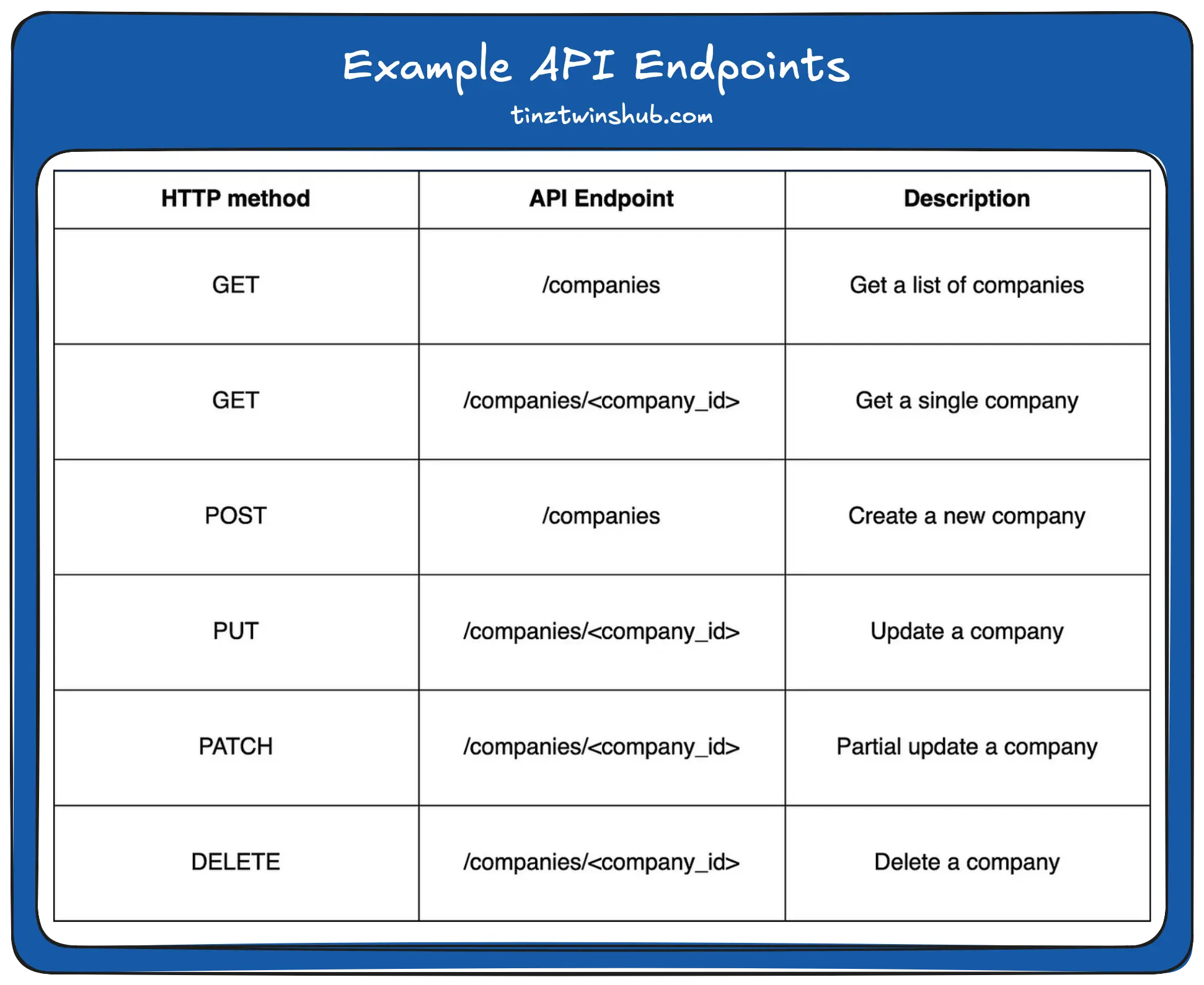
Each endpoint performs a different action based on the HTTP method. To interact with an API endpoint, you need the base URL of the web service. In our example, let’s assume that https://example.api.com/ is the base URL. Then you can access the first GET endpoint from the table with [https://example.api.com/companies](https://example.api.com/companies){:target="_blank" rel="noopener"}. Production-ready applications have hundreds of different endpoints or more to manage resources.
## Building REST APIs with Python
Designing a REST API is a big challenge. You should know the best practices to build maintainable APIs. We show you which steps you should follow when creating a REST API.
### Recommended Steps
**Identify Resources:** You need to identify the resources that will be managed by the REST API. It is common to refer to these resources as plural, e.g. companies.
**Define the endpoints:** Once you have identified all the resources, you can define the individual endpoints. An endpoint contains no verbs. You can also use a nested resource (e.g. /companies/<company\_id>/balance\_sheets). It also makes sense to use API versioning. Your resources change over time and then your REST API too. API versioning enables backward compatibility. [URI versioning](https://learn.microsoft.com/en-us/azure/architecture/best-practices/api-design#uri-versioning){:target="_blank" rel="noopener"} is very popular.
**Define the data format:** The [JavaScript Object Notation](https://en.wikipedia.org/wiki/JSON){:target="_blank" rel="noopener"} (JSON) format is the most popular format with REST APIs. JSON stores data in key-value pairs, similar to a dictionary in Python. Below you can see an example.
```json
{
"isin": "US8522341036",
"name": "Block",
"symbol": "SQ"
}
```
**Design Success Responses and Error Responses:**
You should make sure that the responses follow a consistent format. We continue to use JSON as the exchange format. The response therefore contains data in JSON format. The response must set the content-type header to application/json. The header tells the client application how to process the response data.
The frameworks [Flask](https://flask.palletsprojects.com/en/2.2.x/){:target="_blank" rel="noopener"}, [Django REST Framework](https://www.django-rest-framework.org/){:target="_blank" rel="noopener"} and [FastAPI](https://fastapi.tiangolo.com/){:target="_blank" rel="noopener"} are popular among Python developers.
## Consuming APIs with Python
In our view, the best tool for interacting with REST APIs in Python is the package [**requests**](https://requests.readthedocs.io/en/latest/). To use **requests**, you need to install the package with pip. We recommend that you first create a virtual environment (e.g. [conda](https://docs.conda.io/projects/conda/en/latest/user-guide/install/index.html){:target="_blank" rel="noopener"}). You can then install the package in this virtual environment.
**Installation of requests:**
```python
pip install requests
```
We show you how to use **requests** to interact with a REST API. To test the package, we use the free Fake API [JSONPlaceholder](https://jsonplaceholder.typicode.com/){:target="_blank" rel="noopener"}.
### GET
```python
import requests
url = 'https://jsonplaceholder.typicode.com/todos/1'
response = requests.get(url)
print(response.json())
print(response.status_code)
print(response.headers['Content-Type'])
# Output
# {'userId': 1, 'id': 1, 'title': 'delectus aut autem', 'completed': False}
# 200
# application/json; charset=utf-8
```
This code sends a GET request to `/todos/1`. The response is the to-do item with the `id=1`. With `.json()` on the response object, you can view the data from the API. In addition, you can view the status code and the HTTP headers.
### POST
```python
import requests
url = 'https://jsonplaceholder.typicode.com/todos'
todo = {"userId": 1, "title": "Buy Tesla shares", "completed": False}
response = requests.post(url, json=todo)
print(response.json())
print(response.status_code)
# Output
# {'userId': 1, 'title': 'Buy Tesla shares', 'completed': False, 'id': 201}
# 201
```
The `todo` dictionary contains the information for a new todo item. Then you pass the dictionary to the keyword argument `json`. Then, the `requests.post()` function automatically sets the Content-Type header to `application/json`. The response contains a JSON string and the status code `201` (Created).
### PUT
```python
import requests
url = 'https://jsonplaceholder.typicode.com/todos/10'
todo = {"userId": 1, "title": "Buy Apple shares", "completed": False}
response = requests.put(url, json=todo)
print(response.json())
print(response.status_code)
# Output
# {'userId': 1, 'title': 'Buy Apple shares', 'completed': False, 'id': 10}
# 200
```
With the `requests.put()` method, we update the item with `id=10`. The response from the REST API contains a JSON string with `id=10`. We also get back the status code `200` (OK). So the resource has been successfully updated.
### PATCH
```python
import requests
url = 'https://jsonplaceholder.typicode.com/todos/7'
todo = {"title": "Buy Block shares"}
response = requests.patch(url, json=todo)
print(response.json())
print(response.status_code)
# Output
# {'userId': 1, 'id': 7, 'title': 'Buy Block shares', 'completed': False}
# 200
```
Now, we use `requests.patch()` to update a specific field of an existing to-do item. The response is the updated todo item and the status code `200` (OK).
### DELETE
```python
import requests
url = 'https://jsonplaceholder.typicode.com/todos/10'
response = requests.delete(url, json=todo)
print(response.json())
print(response.status_code)
# Output
# {}
# 200
```
You can also remove a resource with `requests.delete()`. The `url` contains the `id=10` we would like to remove. The REST API returns an empty JSON string and the status code `200` (OK).
The **requests** package is a great tool for interacting with REST APIs in Python.
## Conclusion
In this article, we showed you the basics of REST-APIs. REST-API is the hero of modern web development.
**Lessons learned:**
* **Understanding the REST architecture style**
* **HTTP methods and status codes**
* **Learn best practices about the definition of endpoints**
* **Use the requests package to interact with REST APIs**
Thanks so much for reading. **Have a great day!**
💡 Do you enjoy our content and want to read super-detailed guides about AI Engineering? If so, be sure to check out our premium offer!